Titel: IDE-USB bridge for Datafab MD2 USB 06.01.01
URL:
Disclaimer: The information about the products of Datafab and/or OnTrack are not based on information of the manufaturers. Use at your own risk
IDE-USB bridge for Datafab MD2 USB
1IDE-USB bridge for Datafab MD2 USB 2
1.1History 2
1.2Verification of functionality 2
Bugs 3
1.4To-Do 3
Helper tools 3
1.5.1JUsb 4
1.5.2SniffView 4
1.6Acknowledgement 4
1.7Software usage 5
1.7.1Installation 5
1.7.2Usage 5
1.7.3Supported kernel versions 5
1.7.4Booting from an USB disk drive 5
1.7.5Tools used 6
1.8Technical details 6
1.8.1Protocol 6
1.8.2Problems & Solutions 7
As all tales begin with "Once upon the time" this begins also.
Once upon the time, the hard disk drive build into my notebook (some no-name) not big enough anymore. At the time I changed the disk, I saw an article in the German Computer Magazine c't describing exactly what I want: An enclosure for the now spare old disk to be used via USB. Of course, there was no driver for Linux and the names I got from the support@datafabusa.com were at the end a block whole. I got no answer from the supplier of the windows driver Onspec (www.onspecinc.com). So I was on my own: I knew at this time that USB exists, SCSI has been a long time ago and the last time I wrote a hard disk driver was on a homebrew m68k board
At first I got the USB spec from www.usb.org. Fortunately they are freely available, in opposite to the IDE specs. Strengthened by this knowledge, I started to log what's happening on the USB with the W98 driver. The protocol turned out to be very easy (see Protocol, Protocolunten).
Kernel code in general and a disk driver in particular is a thing which has to be carefully verified against programming errors. In this case, verification has been done in three stages
Comparison with an VFAT file system created by the (W98-)driver supplied with the disk. I copied from my existing Windows 98 installation on two partitions various files & directories. From Linux, I compared the contents of the IDE-disk with the contents of the USB disk. Access was read-only at that time.
During development, I copied the RedHat 7 distribution using Windows to the USB disk and upgraded my Linux with the ISO-9660 images from the USB disk, still running read-only.
The final test was to create a ext2-file system on the USB-disk and copying my root partition to the USB disk. The other (vfat) partition was not affected by this activity and is still intact. After booting from the USB disk and some successful kernel builds I considered the driver to be usable.
The chapter above described that I tried to verify the operation of the disk carefully. This has not been so difficult, since the protocol is not that complicated. The only occurrence of what can be considered as a bug is the effect that the LED in the USB disk enclosure sometimes get dark as if the USB does not longer provide power. As a result, Linux "hangs" so that I cannot see whether a log-entry is made by the USB-driver.
I'm not sure whether this is a bug in the protocol (I have no idea why) or an interference with power management. This is the reason why I consider the driver still as "experimental".
The driver has been developed with the output of Sniffusb as the base for the protocol and the Linux sources as the base for integration. I have tried several ways to integrate MD"-USB into the kernel: from usb-storage.c as a start, ide-scsi.c as a second try finding at the end the sources in the paride directory the ones which I was able to adapt for the driver.
I have still some open questions & planned enhancements
Support of multiple drives. This depends on the availability of a sponsor for a second enclosure and, maybe also a disk. With some luck I will be able get at least the drive.
Integrating the USB disk as a "real" die disk. I have been not successful registering an IDE drive using the ide_scan_devices/ide_register_driver pair.
More investigations, why some constructs do not work as I think they should. See "Technical details" below.
The first test with the protocol have been done via short C-programs. For a more flexible solution, I wrote two JAVA GUI-based helper programs:
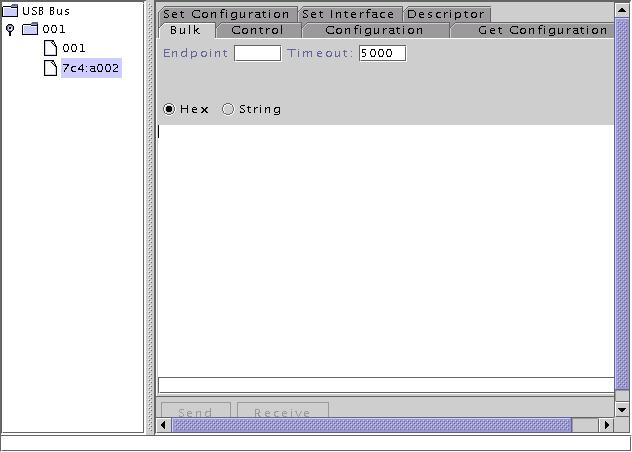
This program allows to send arbitrary commands to a device on the USB. It uses /proc/bus/usb and therefore is only usable with Linux.
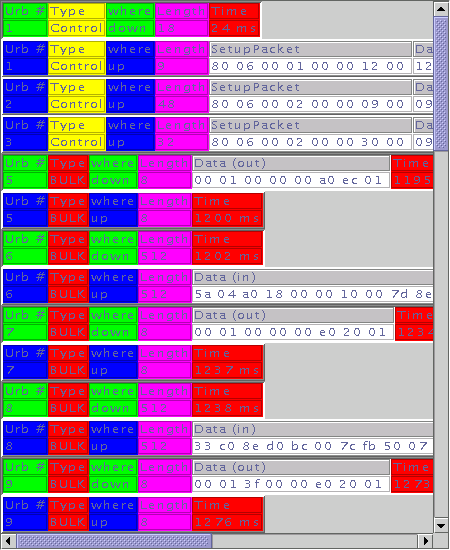
This program displays the output of SniffUSB/DebugView in a graphical form. Makes it easier to recognize certain patterns in the protocol. This program runs with Linux and in theory with Windows. With my Windows 98 it is so slow that I recommend to use it only with Linux.
The software would not be available if I could not use some sources of the kernel. Special thanks to the authors
Michel Gee (michael@linuxspecific.com) and Matthew Dharm (mdharm-usb@one-eyed-alien.net) for usb-storage.c
Gadi Oxman (gadio@netvision.net.il) for ide-scsi.c
Linus for for genhd.c
Grant R. Guenther (grant@torque.net) for paride
tom@wingmanteam.com for the famous sniffusb
Last, but not least, I would like to thank my wife for her patience - she will never understand why people sit half of the night in front of a screen. If you like this software, write her an email that you do so to "Annette.Reisinger@eplus-online.de".
Currently, the modules borrow the major number 97 from the paride package. As soon as I get an official major id, I will change the default. Only one USB drive is supported at this point in time. If I find a sponsor for a second enclosure (inclusive hard disc drive), I will extend the capability to more than one drive.
Unpack ide-usb.tgz somewhere. The tar file creates a directory with the sources and a Makefile. If you type "make install", the files "usb-ide.c" "usb-ide.h" and "usb-ide-debug.h" will be move to /usr/src/linux/drivers/usb/. The files Makefile & config.in will be patched so that you can choose the driver from the standard configuration of the kernel. Make uninstall reverses the patches made.
Compilation is prepared & done by a make xconfig; make modules; make modules_install.
If you insmod ide-usb and connect a drive, you will have access to all the partitions of the drive as known by the IDE/SCSI drives. I created the following device names:
rw-rw-rw root root 97, 0 /dev/uda
rw-rw-rw root root 97, 1 /dev/uda1
rw-rw-rw root root 97, 2 /dev/uda2
rw-rw-rw root root 97, 3 /dev/uda3
rw-rw-rw
root root 97, 4 /dev/uda4
If you add a line "alias block-major-97 ide-usb" in /etc/modules.conf, you won't ever need to bother with insmod/modprobe.
The software has been tested with the kernels 2.2.15 & 2.2.16. The version 2.4.0 of the kernel contains major re-writes of the disk code and will be supported in the future.
It is possible to boot from the USB disk. The utils directory contains a shell script "usbboot", which modifies a boot diskette created by "mkbootdisk". It inserts the necessary "insmod"s for the usbcore, usb-uhci (only at this version) and ide-usb. Since the insmod command is finished before the kernels recognizes the external drive, the parameter "bootWait" instructs the module to wait for drive to be ready before the module initialization functions exits.
A data transfer is always initiated by the host via an 8 byte command string. This strings is very like an IDE command, but not identical (as far as I could get this information out of the kernel sources). If you know more, please tell me and I will incorporate this into the module.
After the command from the host, data is transferred depending on the type of command (READ/WRITE/INQUIRY)
The command bytes are exactly what W98 uses as the first command
to the hard disk:
char * inqCmd;
|
inqCmd[0] |
inqCmd[1] |
inqCmd[2] |
inqCmd[3] |
inqCmd[4] |
inqCmd[5] |
inqCmd[6] |
inqCmd[7] |
|---|---|---|---|---|---|---|---|
|
0x00 |
# sectors |
0x00 |
0x00 |
0x00 |
0xa0 |
0xec |
0x01 |
Procedure:
|
Host (PC) |
|
Device (USB disk) |
|
sndbulkMsg(inqCmd, 8) |
|
|
|
rcvbulkMsg(buffer, 512) |
|
Return identification data |
The drive returns a sector with 512 bytes containing identifying information.
char * rdCmd;
|
rdCmd[0] |
rdCmd[1] |
rdCmd[2] |
rdCmd[3] |
rdCmd[4] |
rdCmd[5] |
rdCmd[6] |
rdCmd[7] |
|---|---|---|---|---|---|---|---|
|
0x00 |
# sectors |
Sector
number |
Sector number (byte 1) |
Sector number (byte 2, MSB) |
0xe0 |
0x20 |
0x01 |
Procedure:
|
Host (PC) |
|
Device (USB disk) |
|
sndbulkMsg(rdCmd, 8) |
|
|
|
rcvbulkMsg(buffer, 512*#sectors) |
|
Read data from desired sector(s) |
char *wrCmd;
|
wrCmd[0] |
wrCmd[1] |
wrCmd[2] |
wrCmd[3] |
wrCmd[4] |
wrCmd[5] |
wrCmd[6] |
wrCmd[7] |
|---|---|---|---|---|---|---|---|
|
0x00 |
# sectors |
Sector
number |
Sector number (byte 1) |
Sector number (byte 2, MSB) |
0xe0 |
0x30 |
0x02 |
Procedure:
|
Host (PC) |
|
Device (USB disk) |
|
sndbulkMsg(wrCmd, 8) |
|
|
|
sndbulkMsg(buffer, 512*#sectors) |
|
Write data to desired sector(s) |
|
rcvbulkMsg(stsbuf, 2) |
|
Return status register from IDE controller |
During the development, I encountered several dead-ends. This section is a description of how the driver works now as well as an inquiry to answer some of my questions, if they are available. I hope this will improve the quality of the driver.
If an USB drive is connected and the module is inserted, the probe-function is called by USB subsystem. If during probe the USB is accessed for bulk transfers, the system hangs. Control transfers work fine.
Workaround: No bulk transfer call to the USB driver is made from the probe function. Instead, the disk identification is derived earliest at the first read from that drive.
A command sequence always starts with a command written to the disk. A code fragment defined as
char *rdCmd = {0, 0, 0, 0, 0, 0xe0, 0x20, 0x01};
rdCmd[1] = numSectors&0xff;
rdCmd[2] = sector&0xff;
rdCmd[2] = sector&0xff;
usb_bulk_msg(..., rdcmd, sizeof rdCmd, ....
always leads to an USB error.
Workaround:
The {inq,rd,wr}Cmd is copied to a page-aligned buffer and send from there.
In “drivers/block/ll_rw_blk.c”:add_request(), the request_fn for a block device is called with a spin lock held. Since it is not a good idea to perform time-consuming operations like data transfer from the USB disk hold spin locks, I release the spin lock. What I cannot restore are the flags which have been saved in add_request(). So immediately before leaving the request_fn, I acquire the spin lock again, only to be released by add_request() again. If somebody enlightens me whether this is necessary, it is welcome.
Disclaimer: The information about the products of Datafab and/or OnTrack are not based on information of the manufaturers. Use at your own risk
Seite